
Market Tools
BTS Heatmaps
BTS Heatmaps make market seasonality easier to research. Weekly heatmaps turn completed calendar-year price history into interactive views of return, consistency, volatility, relative performance, data depth, and BTS Zones across major market benchmarks, U.S. sectors, industry ETFs, country ETFs, and selected stock universes. The Major Indexes — Daily view provides finer calendar detail.
What you can research
- Seasonal behavior: see how selected major market benchmarks, U.S. sectors, industry ETFs, country ETFs, or stocks behaved across the displayed calendar periods.
- Return profile: compare Average Return and Median Return.
- Consistency: compare Positive Week Rate or Positive Day Rate and Win Rate vs S&P 500.
- Risk context: pair Volatility and Return / Volatility with the return metrics to add risk context.
- BTS Zones: highlight selected All Data periods of unusually strong or unusually weak relative performance versus the S&P 500.
- Evidence depth: use Sample Size to check how many historical observations support each cell and whether the selected history window is complete or limited.
For the family-level view, read BTS Heatmaps: A Standardized Seasonality System, which explains how the heatmaps and their Strength Zones backtests are built for direct comparison.
Eight heatmap metrics
Each heatmap includes eight metrics. The color scale, selected-cell value, and explanation update with the selected metric.
| Metric | What it shows |
|---|---|
| Average Return | Shows the average historical return for the selected BTS Day or BTS Week. |
| Median Return | Shows the median historical return for the selected BTS Day or BTS Week. |
| Volatility | Shows the sample standard deviation of historical returns for the selected BTS Day or BTS Week. |
| Return / Volatility | Shows Average Return divided by Volatility, expressing average historical return per unit of return variability. |
| Positive Week Rate / Positive Day Rate | Shows the percentage of historical observations with a positive return for the selected BTS Day or BTS Week. |
| Win Rate vs S&P 500 | Shows how often the selected row beat the S&P 500 for the same BTS Day or BTS Week. |
| Relative Return vs S&P 500 | Shows the average return difference versus the S&P 500 for the same BTS Day or BTS Week. |
| Sample Size | Shows how many historical observations support the selected cell. |
For the S&P 500 benchmark row, S&P 500-relative metrics are not applicable.
BTS Zones
BTS Zones are proprietary research overlays available in the All Data view. They mark selected multi-week periods of unusually strong or weak relative performance versus the S&P 500. The heatmap display is the authoritative source for BTS Zone attribution.
Zone evaluation begins once a symbol has at least 10 consecutive complete years of usable history. Qualifying BTS Zones appear when the historical pattern meets the applicable BTS criteria.
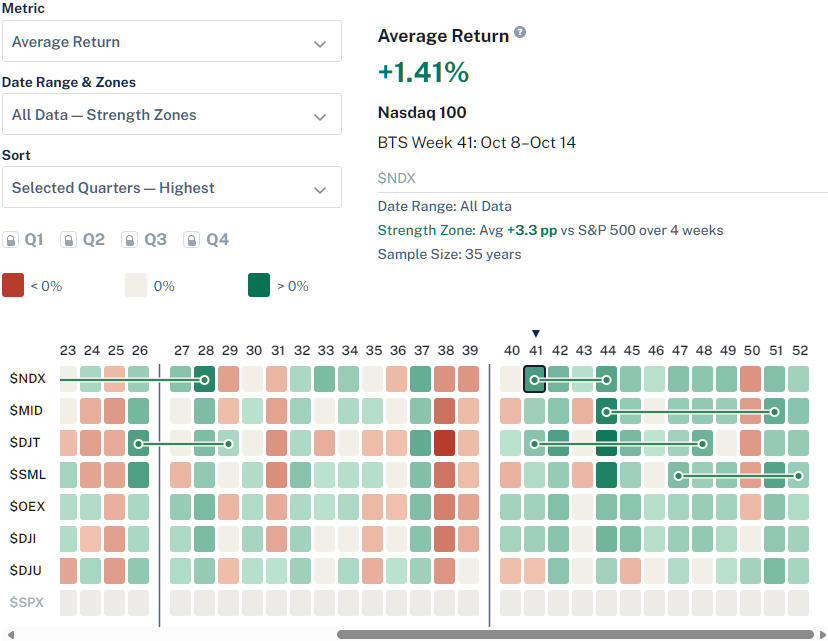
- BTS Strength Zones: highlight selected historical periods of relative strength versus the S&P 500.
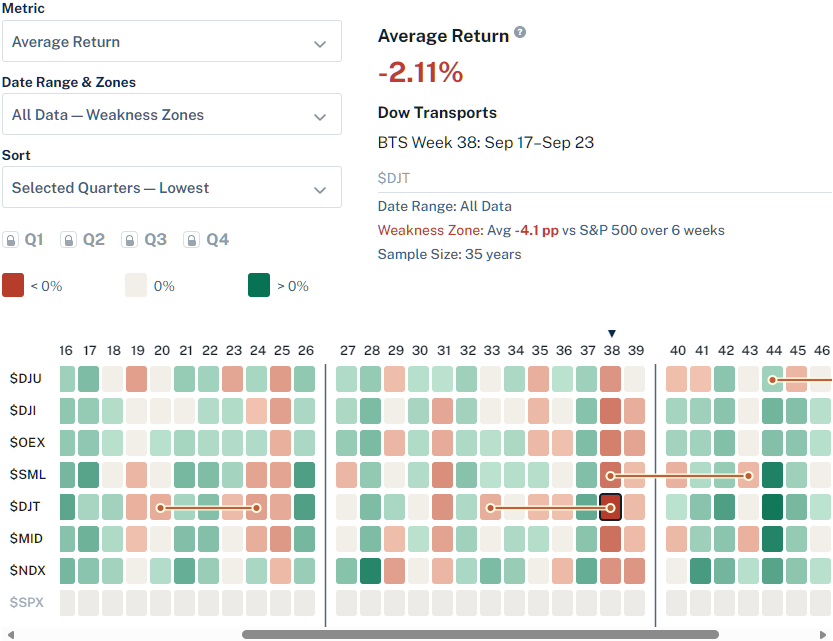
- BTS Weakness Zones: highlight selected historical periods of relative weakness versus the S&P 500.
- History Range & Zones selector: choose All Data — BTS Strength Zones or All Data — BTS Weakness Zones to show one side at a time.
- Selected-cell details: when a cell is inside a BTS Zone, the metrics pane shows the average relative move versus the S&P 500 and the number of weeks in the zone.
BTS Strength Zones example
BTS Weakness Zones example
History ranges and controls
History Ranges compare the full completed-year record with recent completed-year windows. The current heatmap package uses completed calendar years through 2025: Recent 10 Years covers 2016–2025, Recent 5 Years covers 2021–2025, and Recent 3 Years covers 2023–2025. BTS Strength Zones and BTS Weakness Zones are available in the All Data views.
- History Range & Zones selector: switch among All Data, Recent 10 Years, Recent 5 Years, Recent 3 Years, All Data — BTS Strength Zones, and All Data — BTS Weakness Zones.
- Quarter toggles: show or hide Q1, Q2, Q3, and Q4 to focus on a specific part of the year. In BTS Zones display modes, all Zone periods remain visible.
- Week 53 toggle: show or hide BTS Week 53.
- Sorting: sort alphabetically, by the current BTS Day or BTS Week, or by a selected date range, from highest to lowest or lowest to highest.
- Selected-cell details: click a cell to see the metric value, group, BTS Day or BTS Week, History Range, History Status or BTS Zone status, and Sample Size.
Open a heatmap
Current coverage: 8 major-index and benchmark rows in both Weekly and Daily views, 11 U.S. sectors, 94 industry ETFs, 39 country ETFs, 65 Dow-65 stocks, plus eligible Nasdaq-100 and S&P-100 stocks.
Coverage reflects the symbols that currently meet BTS data-history requirements and may change as constituents and available histories change.
| Heatmap | Required access | Best for |
|---|---|---|
| Major Indexes — Weekly | Free Account | Weekly seasonal context across major U.S. indexes and benchmarks. |
| Major Indexes — Daily | Pro | Daily seasonal context across major indexes and benchmarks. |
| U.S. Sectors | Pro | Sector-level seasonal context across major U.S. equity sectors. |
| Industry ETFs | Ultra Pro | Industry-level seasonal context for more granular comparison. |
| Country ETFs | Ultra Pro | Country-level seasonal context across selected country ETFs. |
| Dow-65 Stocks | Ultra Pro | Seasonal comparison across 30 Dow Industrials, 20 Dow Transports, and 15 Dow Utilities. |
| Nasdaq-100 Stocks | Ultra Pro | Stock-level seasonal context across eligible Nasdaq-100 constituents. |
| S&P-100 Stocks | Ultra Pro | Stock-level seasonal context across eligible S&P-100 constituents. |
Methodology notes
These notes summarize conventions used across BTS Heatmaps.
- BTS Week and BTS Day attribution: BTS Weeks and BTS Days follow proprietary BTS-defined calendar mappings. The heatmap display is the authoritative source for BTS Week, BTS Day, and BTS Zone attribution.
- Metric calculations: The eight heatmap metrics use the definitions shown in the help icons and summarized above. Daily views apply those definitions to BTS Day observations; weekly views apply them to BTS Week observations.
- Heatmap eligibility: A symbol must have usable data for the three most recent completed calendar years to appear in a heatmap. The BTS Nasdaq-100 Stocks Heatmap and BTS S&P-100 Stocks Heatmap may therefore contain fewer than 100 eligible constituents.
- Zone eligibility and availability: BTS Zone evaluation requires at least 10 consecutive complete years of usable history. A symbol may qualify for the heatmap without having enough history for Zone evaluation. Even when eligible, a BTS Zone appears only when the historical pattern meets all applicable BTS criteria.